In the world of AI and automation, building a workflow that “just works” is only the first step. As your business grows and your data volume increases, a simple workflow can quickly become slow, expensive, and prone to hitting API limits. This is where workflow optimization becomes a superpower.
In this guide, based on the GenAI Unplugged tutorial, we will break down how to transform a “clunky,” unoptimized workflow into a high-performance automation machine. You’ll learn how to reduce node executions by up to 50%, save time, and build systems that scale effortlessly.
Table of Contents
- Introduction to n8n Optimization
- The 4 Golden Rules of Workflow Optimization
- Case Study: Unoptimized vs. Optimized Feedback Processing
- Visual Comparison: Performance Metrics
- Smart Usage of Looping and Merging
- The Power of Batching APIs
- Choosing the Right Strategy for Your Data
- Frequently Asked Questions (FAQs)
- Conclusion: Key Takeaways
Introduction to n8n Optimization
When you first start with n8n, the tendency is to build workflows linearly—one step after another. While this is great for learning, it’s often the least efficient way to process data.
Optimization is the practice of making your workflows faster, more performant, and scalable. In n8n, every node execution counts. If you are processing 100 items and each item requires 5 nodes to run, that’s 500 executions. Optimization seeks to slash those numbers, reduce the “chatter” between n8n and external apps (like Airtable or Slack), and ensure your automation doesn’t crash under pressure.
The 4 Golden Rules of Workflow Optimization
Before diving into the technical build, the video outlines four fundamental tips every automation expert should follow:
- Remove Redundant Nodes: Every node is an individual step. The fewer the nodes, the faster the workflow. Always look for unnecessary steps that can be combined or deleted.
- Use Parallel Processing: If tasks don’t depend on each other (e.g., sending a Slack message and updating a Notion database), execute them in parallel branches rather than a sequence. This saves significant time.
- Minimize API Calls: API calls are the biggest bottleneck. If an app allows “Bulk” or “Batch” requests, use them. Updating 100 records in one call is vastly superior to 100 individual calls.
- Loop and Merge Smartly: Avoid “Search” nodes inside loops whenever possible. Use the Merge node to enrich your data upfront before you start processing.
Case Study: Unoptimized vs. Optimized Feedback Processing
To illustrate these tips, the tutorial compares two versions of a customer feedback workflow. The goal is to:
- Fetch 100 customer feedback entries.
- Find the customer’s record in a CRM (Airtable).
- Update the feedback.
- Send a thank-you email.
- Notify the support team if the rating is low (less than 3).
The Unoptimized “Naive” Version
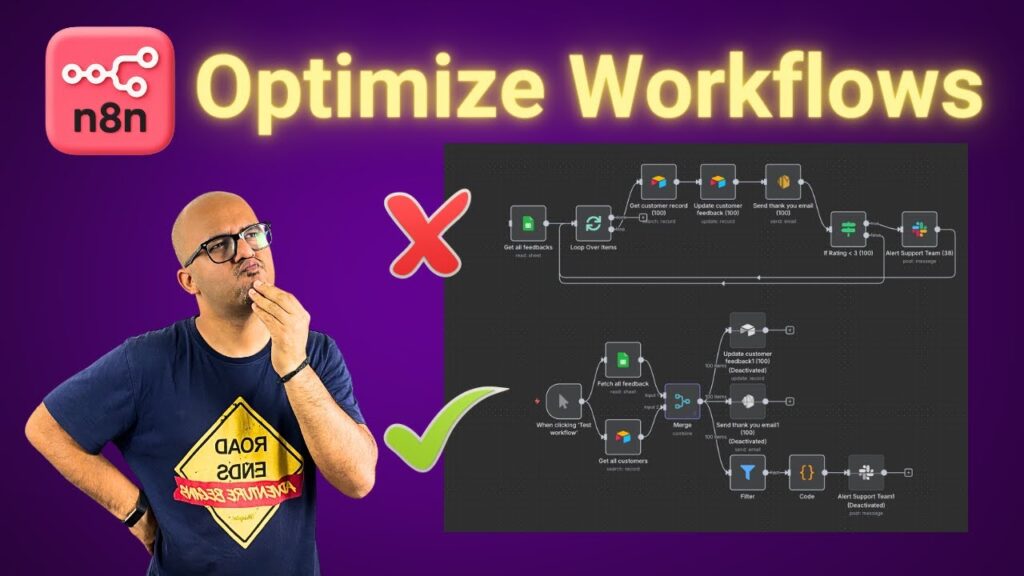
In this version, the workflow uses a Loop Over Items node. For every single one of the 100 items, it performs an Airtable “Search” and an Airtable “Update.” It also sends a Slack alert for every low rating individually.
- Result: This results in 441 node executions. Because each node has to wait for the API to respond before the next one starts, the workflow is incredibly slow.
The Optimized “Professional” Version
This version flips the logic on its head:
- Fetch Once: It fetches all customer records from the CRM in one go before any loop starts.
- Merge Upfront: It uses the Merge node to combine the feedback data with the CRM data based on a common field (like email).
- Consolidated Alerts: Instead of 38 separate Slack messages for 38 bad ratings, it uses a Code Node to aggregate all bad feedback into a single summary message.
- Result: The node executions drop to 206—a 50% reduction in overhead.
Visual Comparison: Performance Metrics
The following table summarizes the data from the video comparison:
| Metric | Unoptimized Workflow | Optimized Workflow | Improvement |
| Total Node Executions | 441 | 206 | ~53% Faster |
| CRM Search Calls | 100 (Sequential) | 1 (En Masse) | 99% Reduction |
| Support Alerts | 38 (Spammy) | 1 (Consolidated) | Clean Communication |
| API Rate Limit Risk | High | Low | Much Safer |
Smart Usage of Looping and Merging
One of the most powerful “pro tips” in the video is the move away from Search-in-Loop.
When you put a search node (like Google Sheets “Get Row” or Airtable “Get Record”) inside a loop, you are forcing n8n to make a round-trip to that service for every single item. If you have 1,000 items, that’s 1,000 requests.
The Optimized way:
- Fetch the entire dataset from App A.
- Fetch the entire dataset from App B.
- Use the Merge node to join them in n8n’s memory.
- Now you have “Enriched” data ready for your loop without making extra API calls.
The Power of Batching APIs
While the tutorial keeps some updates sequential for simplicity, it highlights the Batch API concept. Applications like Airtable allow you to send up to 10 records in a single “Update” call.
If you use a batching approach, you can reduce 100 update nodes down to just 10. This not only makes the workflow faster but also ensures you don’t get blocked by the external service for “spamming” their API.
Choosing the Right Strategy for Your Data
How do you decide which optimization to use? Refer to this table:
| Scenario | Best Optimization Strategy |
| Sending notifications | Aggregate: Collect all data and send one summary Slack/Email. |
| Comparing two datasets | Merge Node: Avoid loops by joining data based on a key (Email/ID). |
| Independent tasks | Parallel Branches: Execute multiple paths at once. |
| High-volume updates | Batch API: Send records in groups rather than one-by-one. |
Frequently Asked Questions (FAQs)
1. Does a smaller number of nodes always mean a faster workflow? Generally, yes. Each node has a small execution overhead. However, replacing 10 nodes with one very complex JavaScript Code node might be faster, but it also makes the workflow harder to maintain.
2. What is “Parallel Processing” in n8n? It’s when you have multiple nodes connected to the same output of a previous node. They run simultaneously rather than waiting for each other.
3. When should I use the Merge node instead of a Search node? Use the Merge node when you already have or can easily get both datasets. It is almost always faster to merge in n8n than to perform a search for every item in a loop.
4. How does the Code Node help with optimization? In the video, a Code Node was used to transform 38 different items into one single text summary. This reduced 38 Slack notifications down to one single message.
5. Is optimization necessary for small workflows? If your workflow handles 5 items once a week, optimization isn’t critical. But if it handles hundreds of items daily, optimization is necessary to prevent failures and save on resource costs.
Conclusion: Key Takeaways
Optimizing your n8n workflows is the difference between a “hobbyist” automation and a “production-ready” system. By following the tips from GenAI Unplugged, you can ensure your workflows run lean and mean.
Key Takeaways:
- Reduce Node Count: Fewer steps = more speed.
- Think Parallel: Stop building single-file lines if nodes can work side-by-side.
- Batch & Merge: Don’t “search” in loops. Get your data early and join it in memory.
- Consolidate: One clear summary is better than 50 individual pings.
Watch the full lesson here: How to Optimize Workflows in n8n