
I Comf you’re a YouTube creator, you already know this truth:
Comments are gold.
They build community.
They increase watch time.
They signal engagement to the YouTube algorithm.
But replying to every single comment? That takes time — especially when your channel starts growing.
What if AI could draft smart, relevant replies for you automatically… without writing a single line of code?
Today, I’m going to show you how to build a YouTube Comment Responder automation that:
- ✅ Checks all your YouTube videos
- ✅ Finds the newest comments
- ✅ Drafts ready-to-post replies
- ✅ Saves everything neatly in Google Sheets
- ✅ Requires ZERO coding
Let’s break it down step-by-step.
Why Responding to YouTube Comments Is So Powerful Using N8N
When someone leaves a comment on your video, they’re doing more than typing a message. They’re:
- Showing interest
- Asking questions
- Starting a conversation
- Giving feedback
- Signaling to YouTube that your content matters
The more engagement your video gets, the more likely it is to be recommended.
The problem?
Most creators:
- Miss comments buried in notifications
- Forget to respond
- Don’t know what to say
- Get overwhelmed as the channel grows
That’s where automation changes everything.
Introducing the YouTube Comment Responder ( N8N)
This automation uses:
- YouTube
- Google Sheets
- n8n
- AI (like GPT-style models)
Together, they create a powerful, no-code system that works in the background for you.
What It Does
- Checks all videos listed in your spreadsheet
- Pulls the newest comments
- Sends each comment to AI
- Generates a ready-to-post reply
- Saves the reply in your sheet
You simply copy and paste the response back into YouTube.
No more digging.
No more scrambling.
No more blank reply boxes.
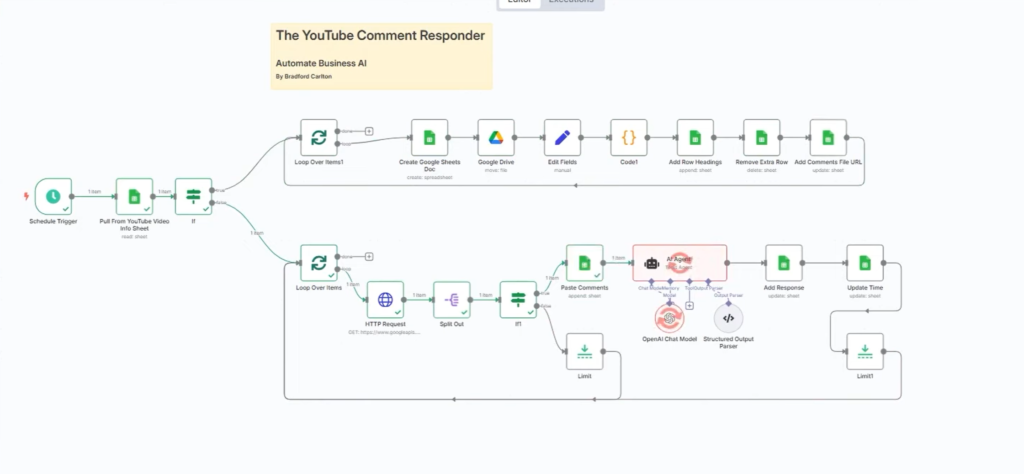
How the System Works (Step-by-Step) Guide
Let’s walk through the entire setup in simple terms.
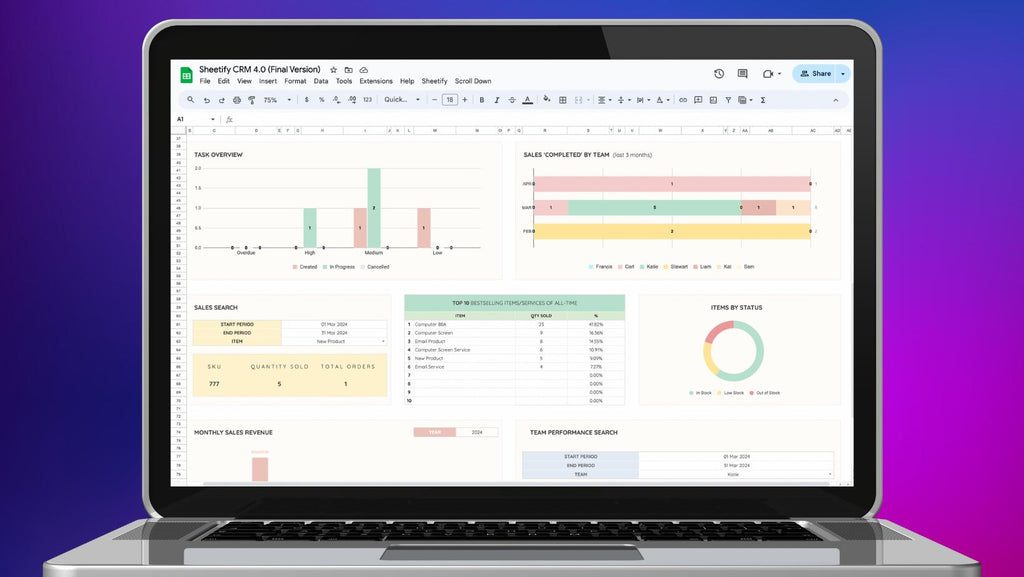
Step 1: Create Your Google Sheet Dashboard
Your Google Sheet becomes your control center.
It includes:
- Video URL
- Video ID
- Latest comment
- Commenter name
- AI-generated reply
- Date pulled
You just:
- Download the template
- Paste your video links
- Done
The automation reads directly from this sheet.
Step 2: Connect n8n to YouTube
Inside n8n, you create a workflow that:
- Connects to YouTube API
- Checks the videos in your sheet
- Pulls recent comments
It filters only NEW comments so you never respond twice.
This is important because:
- It saves time
- It avoids duplicate replies
- It keeps everything organized
Step 3: Send Comments to AI for Smart Replies
Once a new comment is found, the workflow:
- Sends the comment text to AI
- Adds context (your channel niche, tone, personality)
- Generates a thoughtful reply
You can customize tone like:
- Professional
- Friendly
- Educational
- Funny
- Short & direct
Example:
Comment:
“Is this method still working in 2026?”
AI Reply Draft:
“Yes! The strategy still works, but I recommend adjusting it slightly based on the latest platform updates. I’ll be posting an updated version soon — stay tuned!”
Clean. Relevant. Human-sounding.
Step 4: AI Saves the Reply in Google Sheets
The draft reply gets added directly into your sheet.
So your workflow becomes:
Video → Comment → AI Reply → Sheet → You Copy & Paste
Simple.
Efficient.
Scalable.
Why This Is Better Than Auto-Posting Bots
Important: This system does NOT auto-post replies.
That’s intentional.
Why?
- Auto-replies can feel robotic
- YouTube may flag spammy behavior
- You lose personal control
Instead, this method:
- Keeps you in control
- Makes responses fast
- Maintains authenticity
- Protects your account
It’s AI-assisted — not AI-replaced.
The Real Benefits for Your Channel
Let’s talk about growth.
🔥 1. Boost Engagement
When viewers get replies:
- They feel valued
- They’re more likely to comment again
- They’re more likely to subscribe
More engagement = better algorithm performance.
💬 2. Build Stronger Viewer Relationships
Consistency builds loyalty.
If someone comments and you respond quickly, they remember that.
Over time, this builds:
- Community
- Trust
- Brand authority
⏳ 3. Save Massive Time
Manually checking notifications daily:
- 20–60 minutes per day
- Mentally draining
- Disorganized
With automation:
- Everything is structured
- No missed comments
- Replies ready instantly
📈 4. Scale Without Burnout
Small channel? Helpful.
Growing channel? Essential.
Large channel? Critical.
As comments increase, your workload doesn’t need to.
Automation grows with you.
Who This Is Perfect For
This system is ideal if you:
- Run a faceless automation channel
- Teach tutorials
- Do affiliate marketing
- Run a personal brand
- Sell digital products
- Use YouTube for business
If you’re already working with automation tools like n8n for business systems, this fits perfectly into your workflow.
How This Fits Into Your Bigger Automation Strategy
The YouTube Comment Responder isn’t just a small tool.
It’s part of a bigger vision:
- AI-powered marketing
- Automated lead generation
- Smart content workflows
- Time-leveraged business systems
When you combine YouTube engagement automation with:
- Email automation
- CRM workflows
- Affiliate tracking
- Content repurposing
You create a machine that works even when you sleep.
Why n8n Is Perfect for This
n8n is powerful because:
- It’s flexible
- It’s customizable
- It connects with almost anything
- It supports AI integrations
- It can be self-hosted
Unlike basic automation tools, n8n gives you full control.
And the best part?
You don’t need to be a developer.
Want the Full Setup?
If you’re serious about:
- Boosting engagement
- Building stronger viewer relationships
- Never missing comments
- Scaling your YouTube channel
- Leveraging AI in your business
Then it’s time to level up.
When you’re ready to unlock the full potential of n8n-powered automations, join our Advanced Community.
Inside, we share:
- Advanced workflows
- High-converting automation templates
- Step-by-step breakdowns
- Exclusive bonuses
- Real business use cases
These aren’t basic tutorials — they’re growth systems.
Final Thoughts
YouTube growth isn’t just about:
- Better thumbnails
- Better titles
- More uploads
It’s about conversation.
When your audience talks — you respond.
With this YouTube Comment Responder automation:
You stay consistent.
You stay present.
You stay growing.
All with just a few clicks.
If you’re ready to seriously up your game and turn your channel into an AI-powered engagement machine…
Let’s build it. 🚀